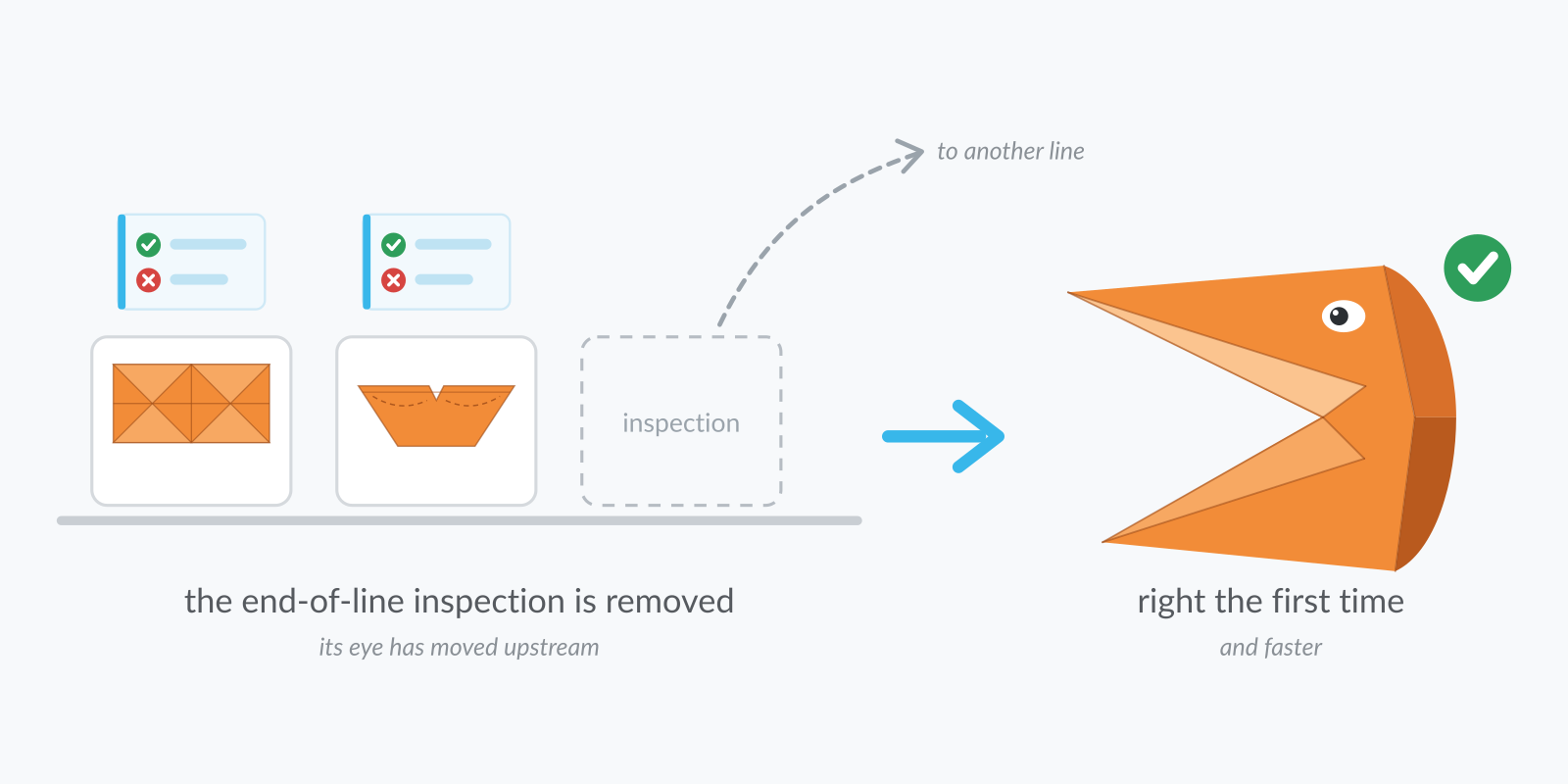
An alternative title for this article could have been: “Remove a skilled person from the chain to deliver faster and better”. My acceptance testing as a PM is a somewhat external quality control, and it becomes useless if I find a way to help developers know what to look at: a Lean standard to ask the right questions, client-oriented scenarios, and an AI agent to make the work easier. The product ships faster, and it is right the first time.
TL;DR
- Removing an external quality control speeds up delivery, provided developers are trained in what to look at and have the tools to forget nothing, without adding to their workload.
- Tests check what the code does; scenarios written without looking at the code check what the user gets, and what they lose if it is wrong.
- Every request enriches the user journeys and the product documentation, every rejected delivery enriches a Lean standard; the automated test replays, and the AI agent takes over when something diverges: it repairs an outdated selector, and leaves any change of behaviour to the acceptance report.
The day I watched the client use the tool
As a lead dev, I built my tool feature by feature, following the specifications point by point. I wrote unit and functional tests from the examples given by the client, when I thought of asking for them. My tests passed, the tool did what it was supposed to do.
Yet the client kept reporting defects I had not seen. I started to really listen, to watch them use the tool, to ask myself why. That is where I grew, by stepping back. Why are they asking us for this product? How do they plan to use it? Are there different user profiles? Which sequence of operations will they go through, and for what purpose? Is the product on its own, or in the middle of a wider chain?
These questions changed the way I build, and it took me a few years to ask them naturally. This is what I wish someone had shared with me when I started.
What code tests do not see
A well-kept product repository has its unit and integration tests. Tests of how the interface behaves are much rarer: they are slow to run, require thinking of many things, and break over a detail that changes. When I was a dev, none of my interfaces were tested with Playwright. My tests covered the business journeys well, but nothing showed how the user felt, whether the buttons worked, whether the menus were aligned, whether text overflowed, how long they waited between pages…
When they exist, these original tests are valuable and I keep them. But they start from the code: when one fails, it says which element is missing, not what the user loses.
On the hiking app
My map of local hiking trails, the one from the previous Lean article, already had a Playwright test of about 400 lines, run on every pull request and before every deployment, from the map to the touch screen. Its messages look like “Leaflet CSS is loaded”. It says the code works. It does not say for whom.
What I wish someone had shared with me
Now a PM, when I run acceptance tests on a delivery, I almost always have something to say. It is not a lack of care in the work delivered: I am looking from a different place, the end user’s.
So I wrote down this point of view in a project dedicated to acceptance testing. It starts from product documentation (in French) written for humans: pages, journeys, personas. The scenarios follow from it, in natural language, grouped by business journey rather than by feature. Each check says what the person loses if it is wrong. Someone who does not code can then read and validate what is checked.
The question “what do we lose if it is wrong?” leads to the situations where things fail.
On the hiking app
Thirteen scenarios where everything goes well found no defect: the existing test already covered those paths. The acceptance testing asks about two scenarios where things fail, and finds two defects. If the trail file is unavailable, the person “sees an empty map with no explanation, believes there is no trail near them, and gives up”. If location access is denied, the “Show my GPS position” button says nothing. No existing test went down these paths.
Journeys grow with the product
On a product that already exists, you start by transcribing what exists into journeys and scenarios, to protect what works: that is the starting base.
Then every change or bug fix enriches them. The agent reads the request with me and, thanks to the standard, defines the web scenarios to play: this is where its understanding of the business helps. It does not get access to the product’s source code right away, otherwise it would be cheating: it stands where user specifications stand, with the business documentation of the product and its ecosystem. Each new scenario joins a user journey, next to the others. The user documentation follows the same path: what the acceptance testing reveals goes into it, after validation.
On the hiking app
The existing tests checked the publication of a new trail on the code side. The “publish” journey looks at the result as the person who maintains the trails: the uploaded trail appears, opens and downloads, without making the others disappear.
The engine: code first, the agent next
The scenario text is the source of truth; the Playwright code is only its transcription. After development and deployment, the request’s scenarios are played: pass or fail. The existing journeys are replayed with them, for non-regression on the rest of the product.
A runner plays all of this without AI, as fast as classic Playwright tests. When a test breaks, the agent takes over. If only a button’s identifier has changed, it fixes the selector, reruns, and reports it in the acceptance report. If the element has disappeared or the behaviour has changed, it is no longer a repair, it is an acceptance finding.
That is the whole point of combining an automated script with an agent that only repairs what is certain: the speed of the script, without the false alarms that make people lose trust in tests.
Lean, to share this point of view
Tests say what to check, not how to look. As in my previous article, I turned it into a Lean standard. It holds my questions: who, to get what, in which difficult situations, with what consequences for the rest of the chain. An example from the hiking app’s journey standard (in French): “The trails are loaded” is not enough; it must be “as many trails drawn as the file contains, otherwise the person sees an empty map and finds no trail to take with them”.
The standard teaches nobody anything: it helps remember the questions at the right moment.
The standard is built one rejection at a time
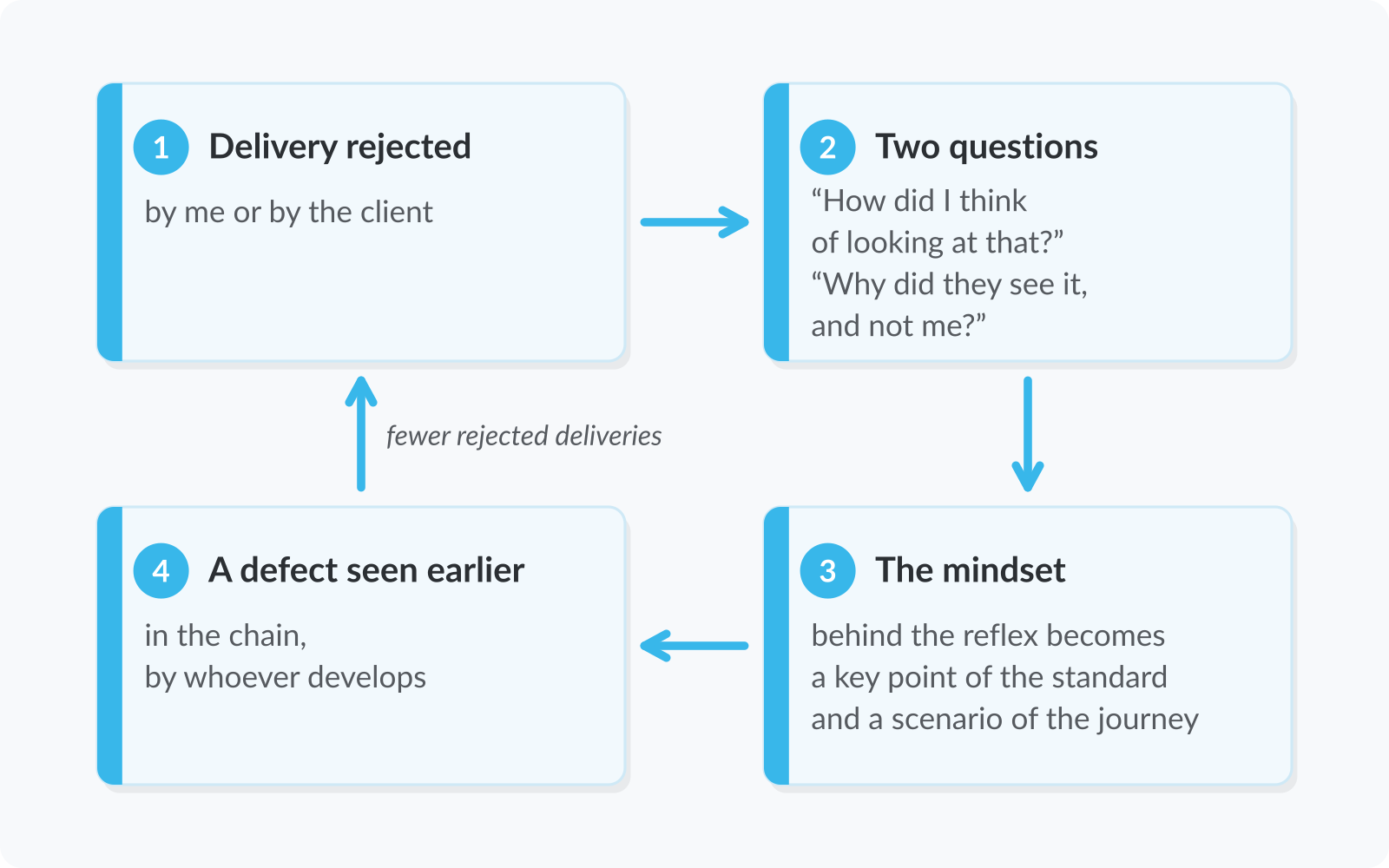
Alongside the journeys, the standard grows with every rejected delivery. This is the moment when I step back from my own work, with two questions. When I reject a delivery: how did I think of looking at that? When the client rejects mine: why did they see it, and not me? What did I miss that I do not want to miss next time?
The answer is almost never “I tested this screen”, but a mindset: who else can be affected? What happens after going to production? That is what I write in the standard: questions that put you in a position to see, not a wall of checkpoints. The journeys improve the product and my knowledge of the client; the standard improves the way I look.
Mine still has gaps: just yesterday, after client feedback, I realised that I mostly check that the feature added to the app works, and I still forget to look at whether the page is pleasant to read and well aligned. This gap became a point of the standard: “if I discovered this page, would I read it effortlessly?”
Try it at home
The how is in the hiking app’s recette/ folder (in French), next to the existing tests: three journeys (find a trail, take it with you, publish it), fifteen scenarios played on the deployed site, their Playwright transcription, the standard and the acceptance command.
What matters is not the tooling, but the standard. Tooling adapts; a standard is passed on.
Making my acceptance testing useless
A few years ago, I took part in a small Lean workshop with Philippe, from Learning to scale, where we made paper fortune tellers. By watching the flows, we saw where things got stuck. We removed one person from the chain, the one who was the bottleneck, and gave the others the tips and tools to be more efficient: the chain eventually reached takt time, with better quality. As the person removed, I could have taken it badly, but I understood that my role was changing: I was skilled, so I could train others, then go and move another chain forward.
Since that day, this is what I put in place. I look for where I am the bottleneck. Rather than duplicating people in my position, I look for what makes me produce quality there, and I upskill the people upstream, with the right tools, so that my position no longer has any non-quality to reject. Removing my acceptance testing must not add work for developers, quite the opposite. People are at the heart of the TPS house: you improve people’s working conditions, so that they produce quality, fast, and above all effortlessly. The product ships faster, it is well made, and I go and bring value to the client elsewhere in the chain. Spoiler: upstream, when qualifying the need… Could I have a next blog post in mind?
These journeys also help during a migration (change of language, version upgrade): they describe the whole product from a business point of view, whereas tests derived from the code go away with it.
And you, what moment made you see your product through the client’s eyes?